
Hosting Your Space with Flotilla
Part of our guide to running an online community you actually own.
Every space lives on a relay, and that relay has to run somewhere. Flotilla can run it for you. Creating the space, changing its settings and paying for it all happen in the app, alongside the space itself. If you’d rather run the server yourself, see Self Hosting a Space.
The hosting panel
Open Settings → Hosting, or use the Hosting section on your home page. It lists every space you host with its status and plan, and holds your payment methods and invoices.
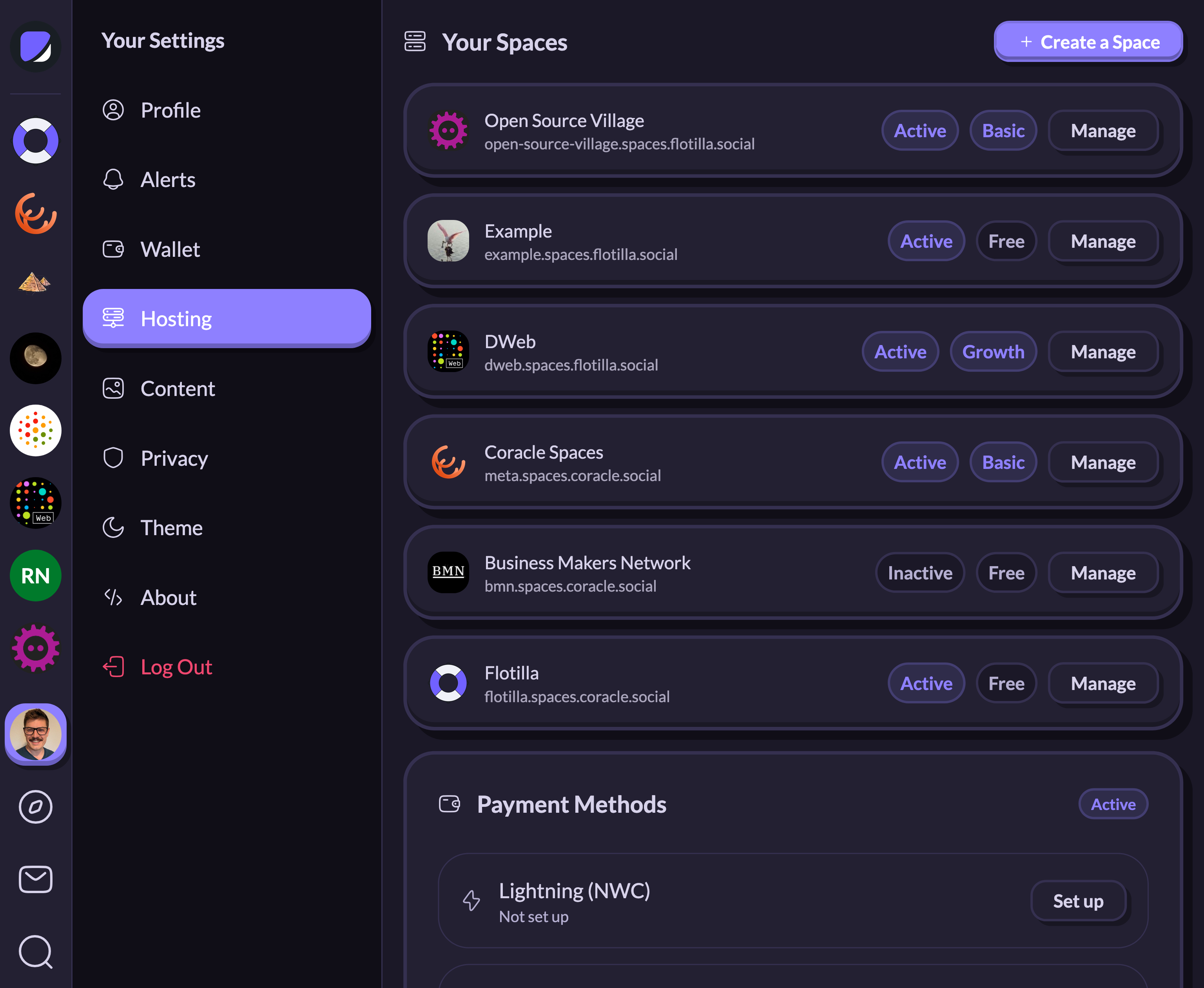
There’s no separate site and no second login. Hosting belongs to the Nostr account you’re already signed in with, so back up that key before you rely on a hosted space.
Creating a space
Create a Space asks for a name, a subdomain, an icon and a description, then a plan. The subdomain becomes your relay’s address: a space called Example lives at example.spaces.flotilla.social. You can put your own domain in front of it later.
The relay is ready in about a minute. Flotilla joins you to the new space and opens its hosting settings. If you chose a paid plan and haven’t saved a payment method yet, it asks for one now.
Plans
| Plan | Price | Members | Media storage & video |
|---|---|---|---|
| Free | $0/mo | 10 | Not included |
| Basic | $5/mo | 100 | Included |
| Growth | $25/mo | Unlimited | Included |
Rooms, the management API and push notifications come with every plan. Media storage and voice/video calls require Basic or Growth. Larger communities that want a white-labeled app, dedicated support and custom development should look at the Platform plan, which is arranged by booking a call.
You can switch plans at any time, and the change is prorated within the month.
Managing a space
Manage next to a space opens its hosting settings, as does Hosting settings in the space’s own menu.
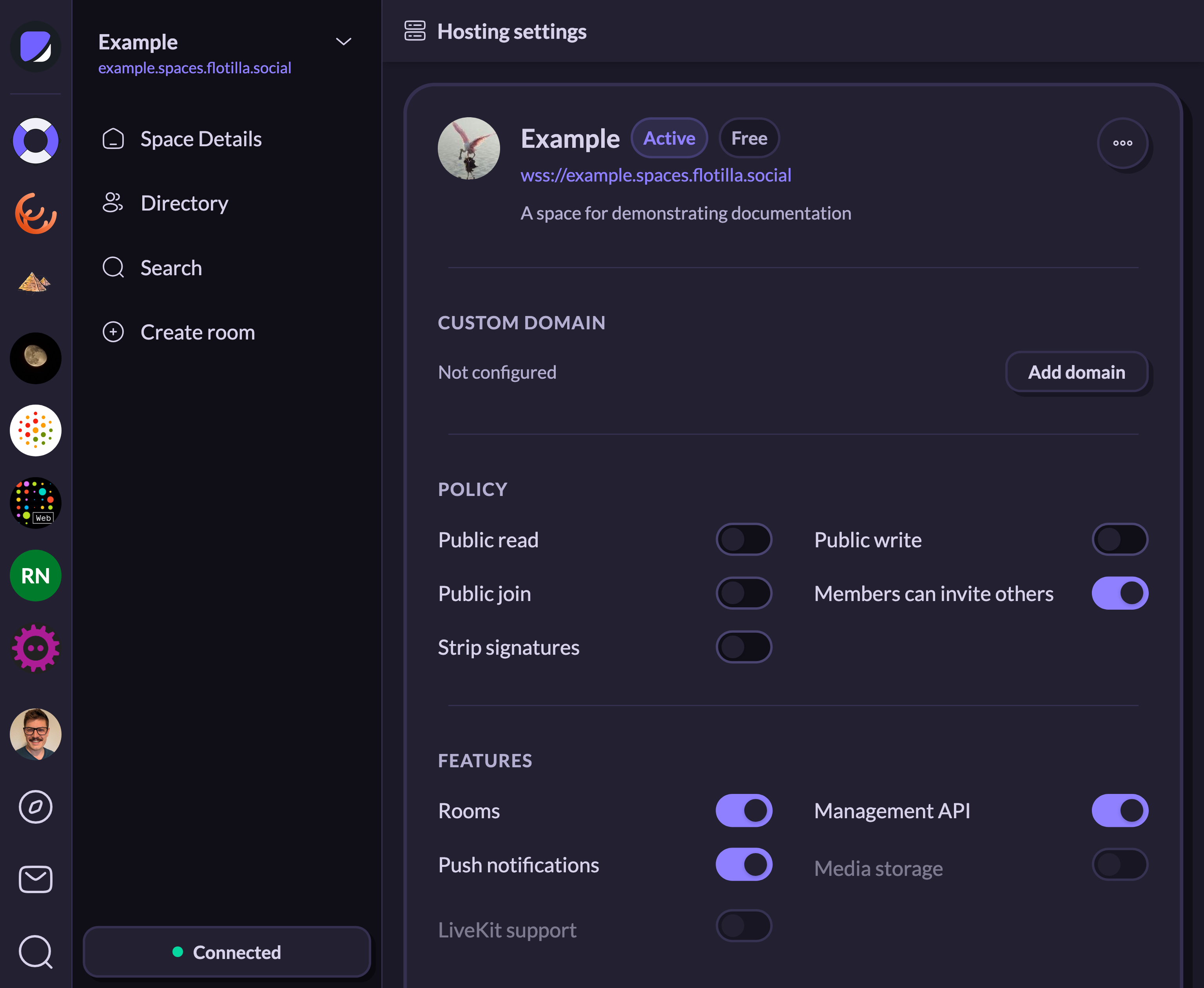
- Custom domain — add your own domain and verify it with a DNS record. See Using a Custom Domain.
- Policy — public read, public write and public join, whether members can invite others, and signature stripping. See Controlling Who Can Join Your Space.
- Features — rooms, the management API, push notifications, media storage and LiveKit, which powers voice and video calls. The last two are greyed out on the Free plan.
- Membership — the number of members in your space, and the limit your plan allows.
The menu in the top right covers the rest. You can edit the space’s name, subdomain, icon and description, change plans, export everything the relay holds as a JSONL file or import one, and deactivate the space. Deactivating takes the relay offline and stops its billing while keeping your data, settings and members, and you can reactivate whenever you want. An activity log below the card records each change.
Moderation isn’t part of hosting. You add members, ban and restore them, and review reports in the space’s own settings; see Managing a Space. The hosting settings show a member count and nothing more.
Paying for it
Payment methods sit at the bottom of the hosting panel: a Lightning wallet connected over Nostr Wallet Connect, a card, or both. Invoices appear under Payment History as they’re issued. Billing and Payments for Your Hosted Space covers autopay, billing cycles and what happens when an invoice goes unpaid.
On iPhone and iPad
Apple doesn’t allow hosting to be sold outside its own payment system, so the iOS app leaves the hosting panel out. Create and manage hosted spaces from the web or desktop app instead. The spaces themselves work the same on every platform.